
When you need to book an intercity bus quickly, the app you use matters because it brings route search, seat selection,
payment, ticket details and journey updates into one mobile flow. The right choice is not simply the app with the loudest offer. It is the app that shows a usable service for your route and date and lets you complete and manage the booking clearly.
A bus booking app is a mobile service that lets you search an intercity route and date, compare the live services
shown, choose a seat or berth, pay for a booking and manage the ticket after payment.
Quick Answer: Choose the App that Completes the Whole Journey
For the best bus booking app in India, start with the task you need to complete. If you are still comparing operators,
departure windows and bus types, choose a platform that gives you a useful search view. If you have chosen a service
and want its direct booking record, current service information and journey tools, the operator app may be the more
useful channel. In both cases, compare the exact route and date, check the final payable amount and read the conditions shown before payment.
What a Useful Bus Booking App Should Let You Do
Use this short test before relying on an app for a same-day or overnight trip:
1. Search the exact origin, destination and travel date rather than a general city name.
2. Show live departures, bus types and the seat or sleeper layout that is actually available.
3. Display boarding and drop points, reporting time and important pickup instructions.
4. Show the final payable fare after the selected seat, charges and eligible offer conditions are applied.
5. Explain which rewards, cashback or coupon terms apply to this booking channel, route, date or payment method.
6. Issue a usable confirmation, e-ticket and PNR after successful payment.
7. Make the applicable cancellation, refund or change terms easy to find before payment.
8. Give the traveler a clear support route and, where provided for the selected journey, alerts or live bus tracking.
The Mobile Booking Workflow from Search to Boarding
A strong bus booking app should make the journey easy to verify in stages. Follow this order when you are booking
online:
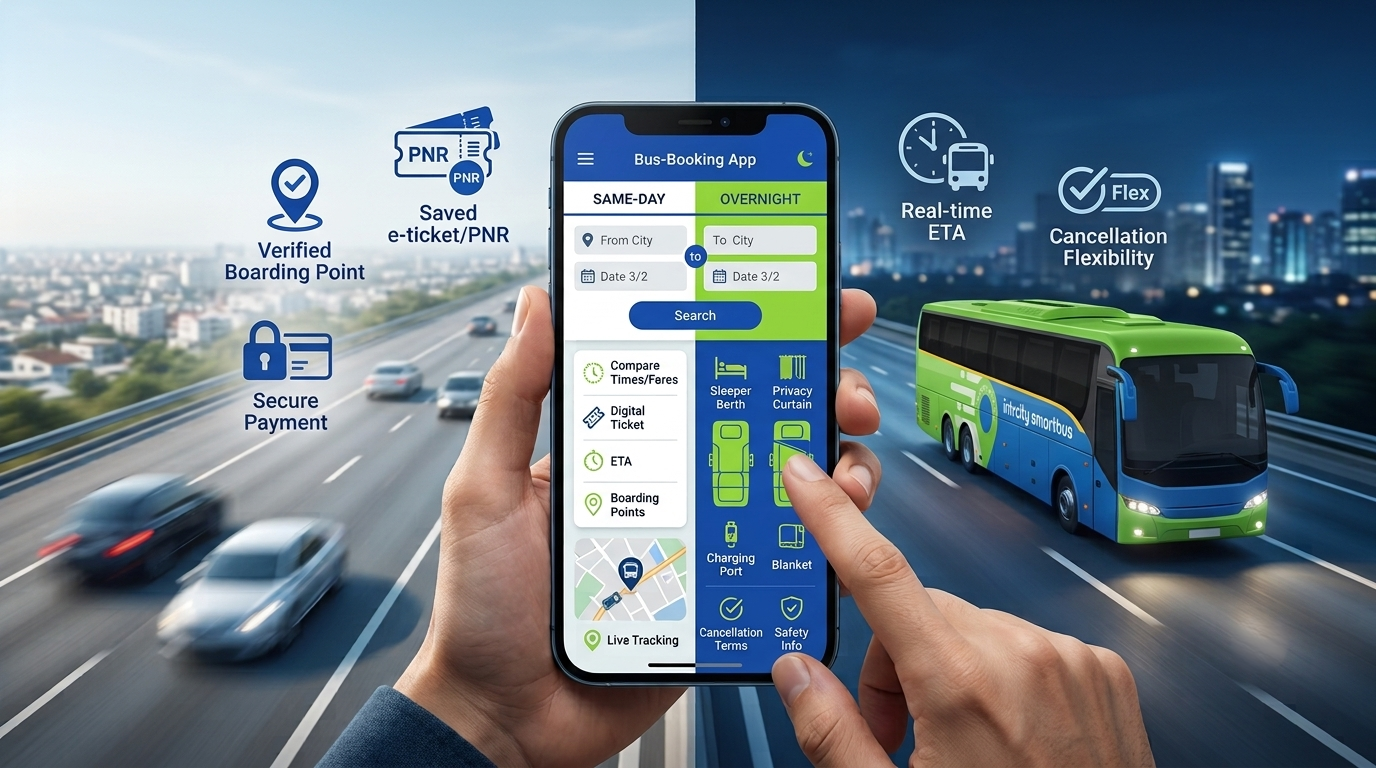
- Enter the route and date. If you need a bus tonight, use today’s date and review the departures still available.
- Compare the live results. Look at departure window, arrival time, bus type and boarding point before opening the seat map.
- Choose the layout. An AC seater, AC sleeper, private sleeper or Volvo service can suit different journeys; use the layout shown for the selected service.
- Open boarding and drop details. Read the landmark, reporting time and location instructions, especially for a late-night departure.
- Review the fare and current offers. Compare the final amount, not just a headline discount, and open the offer conditions before applying anything.
- Read the selected booking terms. Confirm the applicable cancellation, refund, rescheduling and support process for this channel and service.
- Complete payment and save the record. Keep the e-ticket, PNR, passenger mobile number and boarding details available on the phone used for the booking.
- Manage the journey. Use the official ticket or app route for support, changes and live tracking where those options are provided.
How to Compare Bus Booking Apps for Rewards and Cashback
Rewards can change the value of an online bus booking, but the largest headline number is not automatically the best
deal. Check whether the benefit applies to the app or platform you are using, the selected bus, route, date and payment method. Also check whether the benefit is an instant discount, cashback, points or a future travel credit.
For direct IntrCity bookings, use the IntrCity Club page for current miles and redemption information and the bus ticket offers page for live commercial offers. These pages can change, so do not copy a fixed coupon code, cashback amount or expiry date into this evergreen guide.
When comparing two apps, use the final payable amount and the conditions that remain after the reward is applied. A
reward that cannot be used for your route or date does not reduce the cost of that booking.
How to Choose an App When You Need a Bus Tonight
A last-minute booking needs a fast but complete check. Enter the route and today’s date, then compare only the services that still show seats or berths. Open the boarding point, reporting time, arrival window and selected-service amenities before paying. An app is useful when it keeps the live result, booking confirmation and post-booking information connected, it is not a reason to skip the service details.
If a train ticket has not been confirmed, read IntrCity’s Tatkal-failure overnight bus guide for the immediate decision
framework, then return to the live bus search for the route and date you actually need.
How Intrcity Smartbus Fits Into the App Decision
The official IntrCity SmartBus app is an option for travellers who have chosen an IntrCity service and want to search,
book and manage the journey through the direct channel. The current app listings describe intercity bus ticket booking, seat selection, ticket and PNR access, boarding information, changes or cancellation where eligible, offers or coupons,and live journey tools. The exact options depend on the route, service and booking conditions shown at the time.
Start with the IntrCity bus ticket search to check the route and date. If you prefer mobile booking, use the official
Android app listing or iOS App Store listing. Use the official listing links so the ticket and confirmation remain connected to the correct app channel.
After booking, use the IntrCity live bus tracking page where tracking is available for the journey. For booking-specific
help, use the official Contact Us page and the support route shown in the ticket or app.
What to Check for Different Travel Needs
| Travel Need | Start With | Verify Before Paying |
| Same-day travel | Departure window, arrival point and current route availability | Exact timing, boarding point and final fare |
| Overnight bus booking | Sleeper or private-sleeper layout and arrival time | Berth position, boarding instructions, tracking and selected amenities |
| Best bus app for booking in Amritsar | Exact destination, live results and seat map | Whether the app has the route, usable confirmation and a support route for the selected service |
| Bus app with rewards or cashback | Eligibility, payment method and channel | Final payable amount and terms, not just the headline reward |
| Customer support priority | Booking record, PNR and official support path | Who owns the ticket and where the first support request must be made |
| Lowest-fare comparison | Same route, date, bus type and comparable seat or berth | Final amount after charges and offer conditions |
Booking Through the App Versus Another Platform
The booking channel determines where the ticket record, payment status, cancellation request and first support route
are managed. A multi-operator platform can be useful when you are still comparing services. The official IntrCity app can be useful after you have chosen an IntrCity service and want the direct booking record and available journey tools. Do not assume that a reward, support process or tracking feature from one channel automatically transfers to a booking made through another.
For a deeper channel decision, use the How to Choose the Right Bus Booking Channel guide. For a broader comparison of fare, offers, support and cancellation, use the bus booking options guide.
Do Not Skip the Confirmation and Support Check
A search result is not the same as a confirmed ticket. Complete the booking flow and check that payment has succeeded and the ticket or PNR has been issued. Save the confirmation before leaving the app. If the booking was made through a third-party platform, keep that platform’s ticket and booking ID as the primary record.
For detailed cancellation and refund checks, use the bus ticket cancellation and refund guide. The selected ticket and the current policy remain the final reference for any booking.
The Final Word on Choosing a Bus Booking App
The question “which app is best?” becomes easier when it is made specific. Best for which route, which date, which
departure window, which boarding point and which booking or journey-management need?
Start with the live city pair. Compare the service that is actually available, then confirm the seat or berth, boarding
details, selected amenities, tracking and terms. That process remains useful whether you are making an online bus
booking for tonight, checking bus ticket offers, choosing an overnight bus or looking for the best bus app for booking in Amritsar.
Search your route and date on the official IntrCity SmartBus app or website, compare the live services and book the bus that fits your journey.
Frequently Asked Questions
Q1. Which is the best bus booking app in India?
Ans. There is no single app that is best for every route and date. Choose the app that shows the service you need, a usable seat or berth map, the final payable fare, clear booking conditions, confirmation and a support route.
Q2. Which bus app gives the best rewards or cashback?
Ans. The useful offer depends on the route, date, service, payment method and booking channel. Compare the final amount and current terms on the app or platform you will actually use.
Q3. Which bus booking platform has the best customer support?
Ans. Start with the channel that owns the booking record. Check how the app identifies your ticket, PNR and support route before payment, then use the contact method shown in the booking communication.
Q4. Can I book a bus tonight through an app?
Ans. Yes, when the app shows a service with seats or berths for the route and date. Enter the exact route and today’s date, check the boarding time and location, complete payment and save the issued ticket.
Q5. What is the best bus app for booking in Amritsar?
Ans. Use an app that can search your exact Amritsar route and date, show current services and seat or berth details, issue a usable confirmation and provide support or tracking when those options are available.
Q6. Can I track a bus after booking through the app?
Ans. Tracking depends on the selected journey and booking channel. For eligible IntrCity journeys, use the official tracking route with the booking mobile number or PNR when tracking is available.
Q7. Are app rewards valid when I book through another platform?
Ans. Not necessarily. Rewards, cashback, support and cancellation conditions are attached to the booking channel and
selected offer. Read the terms for the channel used to complete payment.
Q8. How do I know my online bus booking is confirmed?
Ans. After successful payment, check that the app or booking channel has issued the e-ticket or PNR. Save the confirmation and verify the boarding and passenger details before travelling.